I have a friend that teaches at a school where engineering is starting to become a huge deal. He went to special training for STEM education. His class is in need of 3-D printing so they can test out the designs they can make. Josh has shared many ideas he has had about 3-D printing, and one is printing robot parts that his students can design! I hope to give you a few examples that will help you see my basic ideas for 3-D printing.
For Biology
I, on the other hand, teach 9th grade biology and 10th grade physical science. For biology, I know just the way I could use a 3-D printer. My students have trouble visualizing DNA replication and protein synthesis. Sure, there are many models of DNA I could order and also manipulatives for protein synthesis, but none of them actually show the processes of these concepts. I could create all the different enzymes that are used to break DNA apart and place it back together, and I could make ribosomes and show how they read tRNA to make proteins.
For Physical Science
For my physical science classes, I could definitely use a 3-D printer. Just a few weeks ago we were learning about simple machines. I really didn't have any material that was fun and active for my students. A 3-D printer would have been great for allowing students to create their very own simple machine! This would help keep students motivated, but also show them how simple machines are used in everyday life by building one.
These are two ways I would use a 3-D printer in my classroom. I still think that 3-D printing is too expensive for every classroom to have one. Would a 3-D printer be a technology tool that would benefit my classroom? Definitely Yes! To other teachers, this might be a different story. Maybe someone who wants to donate a 3-D printer to my classroom will see this post and send one to me!
There are many trends that are current in online learning right now, and I chose one that I wasn't really familiar with to discuss here.
Cloud Based LMS
Cloud Based LMS (Learning management system) is a way for companies and cooperations to send teaching material to employees securely and through a cloud based storage system. When I first read about this technology, I thought systems like Google Drive or iCloud, but these services don't count as Cloud Based LMS. The reason is because they are not built specifically for learning material, they are strictly storage services. I think Google and Apple could use their services to implement LMS, but LMS 's are designed specifically for companies to instruct their employees. Without having to bring all your employees into a central location to teach them a new skill, LMS allows companies to teach and train from anywhere there is internet access.
Some benefits for this service is there cloud based system is secure and protected from outside users. Privacy documents or employee's personal information would be kept safe using these systems. The down side to Cloud Based LMS is their services cost for implementing, as apposed to Google Drive, which is free. Pricing fro Cloud Based LMS's have a huge range: anywhere from $300- $5,000 a month, depending on how many users you would like on your system.
Common Features
Most of the LMS's I have seen have a structured and easy user interface. The learning content is much like traditional online content with modules that can be accessed with learning material inside those modules. Most of them have quizzes and tests that can be assigned. They all have some type of communication between users and the facilitator or instructor. Some of these LMS's offer Gamificaiton to reward users for completing task. Litmos is one of those that offer badges and points to help increase participation within the LMS.
Conclusion
Cloud Based LMS is a great tool for companies, organizations, and cooperations to teach and train workers. They are easy to use and vital to many companies. These systems can be pricey, but many free trials are offered to present an organization with the best fit for them before purchasing. I must say that I have learned more about how training can happen with these LMSs. The big idea for these learning management systems is to cut training cost, give training material to employees easily and at all places, and also getting feedback from data collected from quizzes and assessments.
I have seen alternate worlds like this before, but have never really understood them. I think the best way to describe second life is a place where you can go virtually, and do anything you want. You can walk, run, or fly. You can sit, stand, or view your surroundings. You can buy art work. You can buy services just like real life. It is so different and so open, that I'm not sure if I will spend much time there just exploring.
I really do admire many of the people who create worlds and objects in SecondLife. They truly do have talent. I believe that very creative people will definitely enjoy this. I, on the other hand, have a hard time navigating through the world. I do enjoy being able to fly where every I want to go. Another thing users can do is interact with one another. I believe this is a cool feature, but I don't necessarily believe I would talk to people I didn't know in SecondLife.
I do believe this is a very interesting and great interaction with a whole new way of thinking about worlds, and what people would like to do in this SecondLife world that they wouldn't do in real life. I do believe this will grow on me as I continue to to explore and learn different things about SecondLife. And by the way, SecondLife ISN'T a game!
Looking through Intel's web page, I can see there are a number of different components to RealSense technology. The first component we will see is gestures. RealSense technology allows users to interact with their computer screen with hand movements, head movements, or facial expressions. The 3D camera built into the computer measures in three dimensions, allowing for more unique was of interacting with what is on your screen. This technology can also be used to recognize your face, which can unlock your user on the computer. 3D scanning and printing is all done with this new technology. Another component of this technology is depth perception. With similar 3D cameras, RealSense technology can measure and scale a picture's size. If you wanted to see the distance one object was from another, snap a picture, then allow the software to measure and present the distance on your screen. This is also used when focusing in pictures. The camera recognizes the layers in a photo and then allows the user to focus different areas of the photo. You can change the focus as many times as you want with one picture. Another way to use this technology is called Immersive Chat. This allows those in a video chat to wipe away the background in their camera, and replace the background with something else. This is like using a green screen, without the green screen!
What does this mean for technology?
I believe that some of these technologies are more practical than others. Sure, it would be cool to control a video game with your hands, but would it be useful for painting or sketching digitally? The only two uses I see for that function of the technology is gameplay and some type of drawing or painting app.
3D scanning and printing has increasingly become popular in the last several years, and I believe this is where Intel could really make an impact. If more people have the technology to scan objects (our even their face) the more likely they are to print something with a 3D printer.
Another way that I think this technology will change the way we take pictures is through the focus feature on a smartphone or camera. If you have ever taken pictures, you probably have seen the effect where part of the picture is in focus, while the other is out of focus. I really like this effect and it is sometimes hard to recreate with smartphones. With RealSense, this is a normal feature and can easily be done not only once, but change the focus many times on a single picture. This is a great idea and one I think with be integrated in to almost all smartphones in the near future.
Video chatting is a great way to connect with those who are far away or not able to meet with you face to face. Intel uses their technology to identify you in the video, separate you out of the shot and apply any type of background you need. There are other technologies that do this also (Photo Booth on a Mac). This is great when you want to meed with someone and present something unique and place it in the background. Also, if you were in a beautiful place on vacation, you could place your background with someone else and let them experience your surroundings without them actually being there.
What about Education?
I can see some uses for this in education. This would be a great way to engage students in collaborating outside of school to work on projects. Students could present their projects in the background in a video chat. Students could scan 3D objects and print them on a 3D printer without any extra software. I also thing students could be more creative with project building with these new tools at their fingertips.
I did some research to find the top 10 apps and narrowed the search down to 5 apps. I must say that my opinion of the top apps are different than most writers. So, I will give you a hybrid list of my favorites along with some others' favorites.
This app is a behavior management tool that allows teachers to track and view behavior of students. Students can also connect and see how well they are doing in class. I like the fact that this application can be used on any device, not just a smartphone or tablet. This tool uses positive reinforcement to encourage students to continue good behavior. This app is free and available on iTunes and Google Play.
This app is new for me, and it was difficult to find any information about it. I learned that GoConqr was formally known as Examtime. This app allows teachers to build communities of learning material for students. From here, the teacher can share test pre questions, allow students to create mind maps, create quizzes, and so much more. Another cool feature of this app is it allows students the ability to prepare study time with goals and achievements. This app is also free and available on iTunes and Google Play.
I have always been inspired when watching many of the TED conferences and speakers. The TED app puts all of the wonderful speakers right at the finger tips of teachers in this app. There are hundreds of educational videos that can be found in this app. This app allows you to add playlists and bookmark videos for later use. This app is free and available on iTunes and Google Play.
I have used this app for the first two years of teaching and I love it. This app allows teachers to send out reminders to students and parents of upcoming events and dates. I use this to remind my students of tests that might be coming up soon. Add your classes, your students enroll in your class, and then you are ready to send out reminders. The system works by sending text messages to your students, but the students never receive your cell phone number. The app works great and is free on both iTunes and Google Play.
This is my number one teacher app for 2014-15. I have not used Kahoot, but I hear so many teachers explaining how great it is to use in the classroom. This app allows teachers to create short, engaging review questions and display them as a presentation in the class. This will give students an access code to the survey or quiz. Students then are in the Kahoot and are ready to answer questions. The best way to explain this app is through a video, which I have posted at the end of this blog post. Kahoot is free to download from iTunes and Google Play.
As I look at the pictures in the article, I immediately see a use for this in schools. I can think of at least 3 students at my local high school who could benefit from such a unique and interactive accessibility technology. I can imagine myself as a homebound student who has been learning from home using a text book and being relayed watered down lessons from all of my teachers. At my high school, that is possibly 8 classes of work, tests, quizzes, and no direct interacting with any of my teachers. This technology could change that.
I also think that school systems and technology coordinators will opt to other means of communication instead of this technology. There are two very useful video conference tools that are free: Google Hangouts and Skype that can connect the student from home and to the teacher or class. I believe that the VGo definitely has some good qualities, but I'm not sure that most school systems will jump at this opportunity to allow their homebound students be mobile. If I were the technology coordinator at my school system, I would definitely take a hard look into this technology, but I believe Google Hangouts and Skype are better choices as far as cost and practicality.
What is required for a VGo Robot?
The VGo must be connected to the internet at all times. This is an important aspect of the robot, because if it is not able to get to class to class, then the interactive part for the student will be diminished. The VGo does offer connectivity to Verizon 4G and LTE, which could be a good choice if your WIFI connectivity in your school is minimal. In the high school I work in, the VGo would have little problems navigating the hallways, as our school's WFI infrastructure has been recently upgraded. A VGo robot can cost $5,000 with no extra add ons, such as extended battery life and 4G or LTE connectivity. There is also a service contract that can be purchased through VGo Communications.
To conclude this post, I do think that VGo telepresence is a great tool for homebound students who need social interactions with their peers and teachers. But, I don't think this is a technology that many technology coordinators will be willing to issue to their schools, especially if the school system is large. If you think about cost, in my school system there are 46 elementary, middle, and high schools. If the school system bought 1 VGo robot for each school, that would total to be $230,000. For smaller systems or just for a specific tier of school (ex. just elementary schools) this would make more sense. The VGo is definitely something to watch for in classrooms as technology becomes more mobile and more efficient.
I must start my post with one wearable technology that I know very well and I own. The Fitbit Flex is one device that only has to be taken off if you want to charge it. It is a very small device that fits into a small wrist band. The Flex can track your steps, calories burned, sleep frequency, and exercise activity. The battery is not bad, with 5 days as a regular charge. The Fitbit Flex is a great tool for the everyday user who wants to become more active but still very useful to someone who regularly exercises. You can sync your Fitbit Flex to your smartphone and the stats are displayed right on your phone. From your phone, your stats are uploaded to your online Fitbit account where you can view data in more detail. Here is a short video to give you an overview of the Fitbit Flex.
Here are some screenshots from my Fitbit Flex app and desktop dashboard:
I think the Fitbit Flex is a great tool to use in the classroom. I can see this being used in physical education classrooms as these wearables become more affordable. Students can actually track and monitor their progress as they exercise everyday at school.
Read this article to see how the Fitbit Flex has already helped one school tackle some health and fitness issues: http://www.gazettextra.com/article/20131227/ARTICLES/131229855
The Samsung Gear 2
I have been thinking about smart watches lately, especially with the announced and soon released Apple Watch, but I have been struggling to find a connection with education. Since the Apple Watch still hasn't hit the wrist of consumers, I will focus on a watch that has.
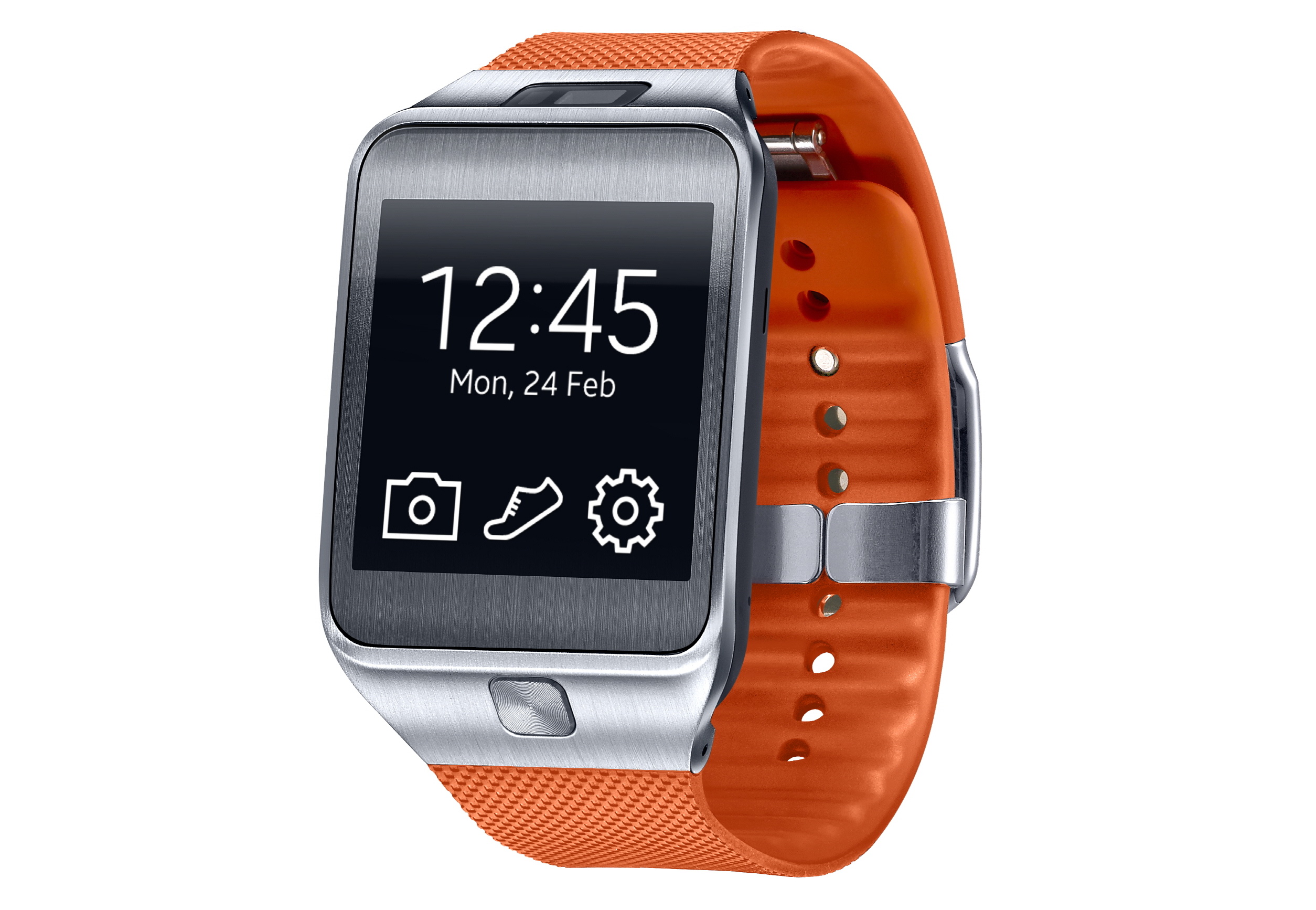
The Samsung Gear 2 has anything you could want from a smart watch. It has a large screen, camera (Which is absent from most smart watches), and a good battery life (about 3 days). The Samsung Gear 2 has health tracking and a heart rate monitor, which seems to be the new standard for health tracking devices.
I can see this as a teaching tool more for teachers than a learning tool for students. As a teacher, if I need to lecture, I like to walk around the classroom to monitor what my students are doing on their computers. With a wearable smart watch such as the Samsung Gear 2, I could easily present a presentation on the smartboard and move from one slide to the next with a swipe of the watch, while at the same time, move around the classroom and monitor each student.
In terms of the students using a device like this, I believe many teachers will see it as another distraction, just like many teacher view cell phones in the classroom. But, I believe that if we can use these tools to engage our students, that is where it will be most valuable. Instead of saying, "OK everyone, get out a pencil and a sheet of paper for this check on your understanding", what if we say, "OK, I just emailed you a survey to see what you learned today, open your email on your smart watch, complete the survey, and then I will give you more instruction". I think the second statement is much more engaging for students in the classroom today, because they are all digital natives and use technology everyday.